Introduction
OneMart Admin & Web is the back-office management panel and customer-facing storefront for the DayOneMart single-vendor e-commerce platform. Built on Laravel 12 with a Vue 3 / Inertia.js frontend, it ships as a single deployable application that serves three distinct surfaces:
- Admin Panel — Full business management interface (orders, products, users, analytics, settings)
- Customer Storefront — SEO-friendly web shopping experience served via Inertia
- REST API — Versioned JSON API consumed by the Flutter Customer App and Deliveryman App
Technology Stack
| Layer | Technology | Version |
|---|---|---|
| Backend Framework | Laravel | ^12.0 |
| PHP Runtime | PHP | ^8.2 |
| Frontend Framework | Vue 3 + Inertia.js | ^3.5 / ^2.1 |
| Build Tool | Vite | ^7.0 |
| CSS Framework | Tailwind CSS | ^4.0 |
| UI Components | Shadcn Vue / Reka UI | ^2.2 / ^2.6 |
| Authentication | JWT (tymon/jwt-auth) | ^2.2 |
| 2FA | Google TOTP (pragmarx/google2fa) | ^9.0 |
| Real-time | Firebase Cloud Messaging (Push Notifications) | ^10.14 |
| Performance | Laravel Octane (Swoole) | ^2.12 |
| Storage | AWS S3 / Local | — |
| Payments | Stripe + multiple gateways | ^17.6 |
| Charts | Chart.js + ApexCharts | — |
| Maps | Google Maps JS API | — |
| Rich Text | Tiptap v3 | — |
| i18n | i18next + i18next-vue | — |
| Firebase | Firebase JS SDK | ^10.14 |
Project Folder Structure
/app
├── Console/
├── Enums/
├── Events/
├── Http/
│   ├── Controllers/
│   │   ├── Api/              ← REST API v1 controllers
│   │   ├── Payment/          ← Stripe, PayPal, Razorpay, etc.
│   │   ├── Web/              ← Inertia page controllers
│   │   ├── InstallerController.php
│   │   └── UpdaterController.php
│   ├── Middleware/
│   ├── Requests/
│   └── Resources/
├── Jobs/
├── Mail/
├── Models/
├── Services/
└── Utils/
    ├── constants.php
    ├── formatter.php
    └── translation.php

/resources/js
├── AdminPanel/               ← Admin Vue application
│   ├── Layouts/
│   ├── Pages/
│   │   ├── Analytics/
│   │   ├── Authentication/
│   │   ├── Dashboard/
│   │   ├── Food/
│   │   ├── Orders/
│   │   ├── Promotion/
│   │   ├── Reports/
│   │   ├── Settings/
│   │   └── ...
│   ├── components/
│   ├── composables/
│   └── locales/
└── StoreFront/               ← Customer web Vue application
    ├── Layouts/
    ├── Pages/
    │   ├── Homepage/
    │   ├── Menu/
    │   ├── Checkout/
    │   ├── Profile/
    │   └── ...
    ├── components/
    └── composables/

/routes
├── api/v1/
│   ├── admin.php
│   ├── customer.php
│   └── deliveryman.php
├── web/
│   ├── admin.php
│   ├── storefront.php
│   ├── installer.php
│   └── updater.php
└── payment.php

/lang          ← en, bn, hi, ar, es translations
/public        ← Document root — point domain here
System Features
Dashboard & Analytics
- Real-time business overview with live order stats and revenue counters
- Sales reports — daily, weekly, monthly, custom date range
- Category performance analytics
- User activity reports and hourly trend charts (Chart.js + ApexCharts)
- Top-selling products and revenue breakdown
 1
2
3
4
1
2
3
4
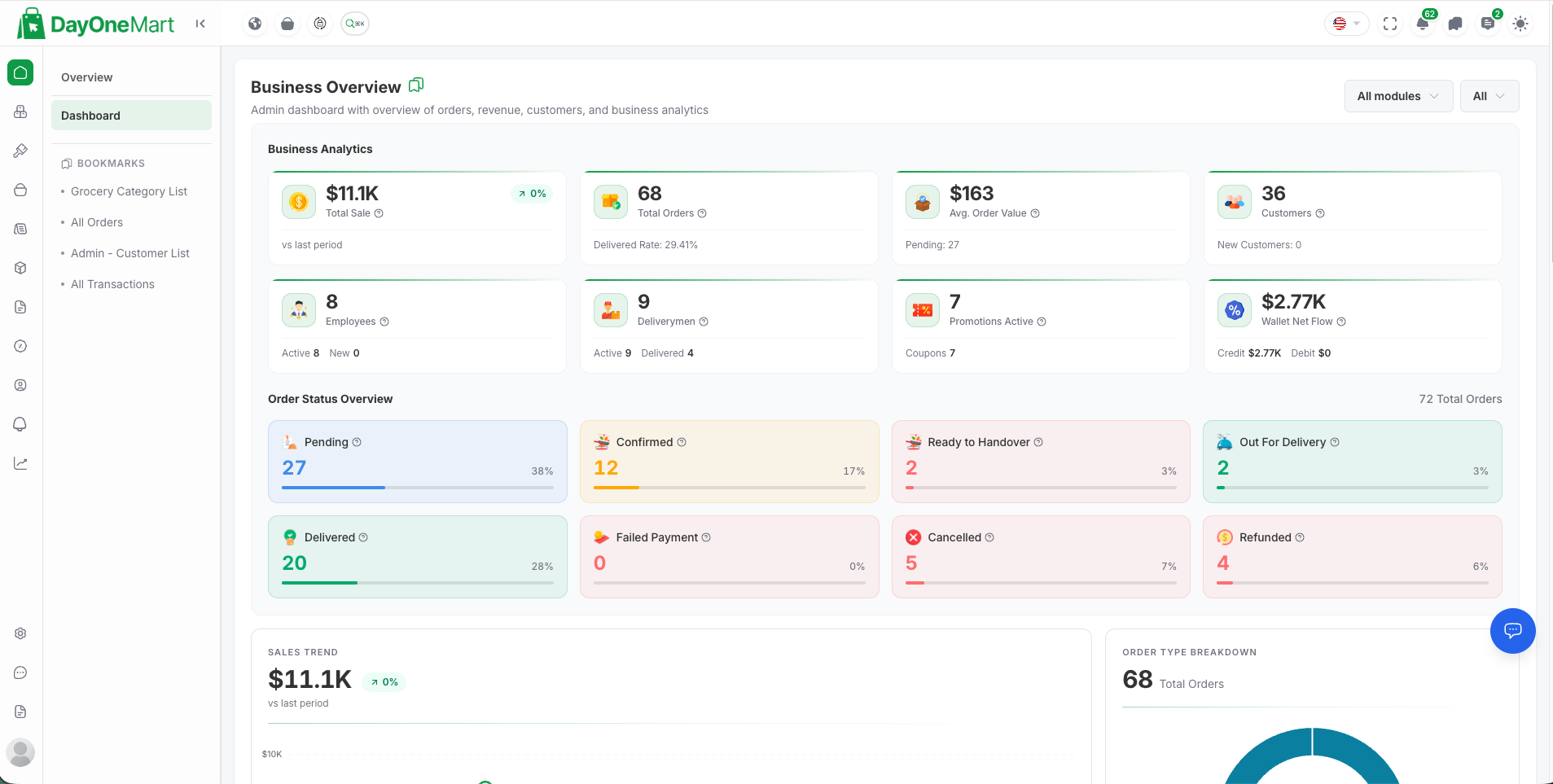
Key areas of this screen
- Business Analytics KPI cards — live totals for sales, orders, average order value, customers, employees, deliverymen, active promotions, and wallet flow.
- Order Status Overview — a breakdown of orders by stage: Pending, Confirmed, Ready to Handover, Out for Delivery, Delivered, Failed, Cancelled, and Refunded.
- Sales Trend — revenue over the selected period versus the previous period.
- Order Type Breakdown — the mix of order types shown as a donut chart.
Order Management
- Full order lifecycle: Pending → Confirmed → Processing → Handover → Picked Up → Delivered
- Assign / unassign deliveryman per order
- Edit order items, delivery address, and customer notes
- Cancel orders with reason tracking
- Refund workflow — approve or reject refund requests
- Invoice generation and download (PDF)
- Payment status management
- Bulk order actions
 1
2
3
4
1
2
3
4
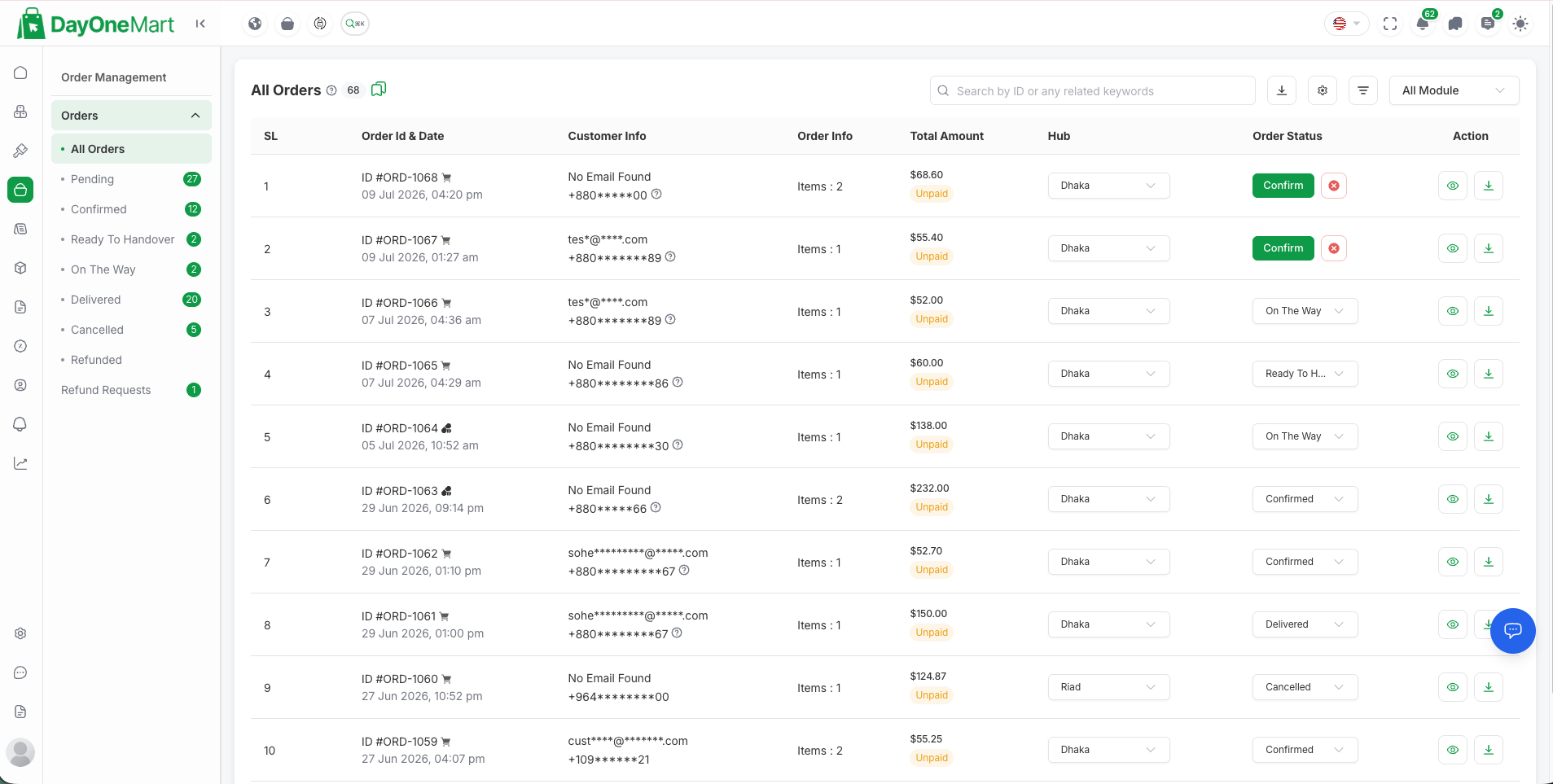
Key areas of this screen
- Status filters (left menu) — jump to All Orders, Pending, Confirmed, Ready to Handover, On the Way, Delivered, Cancelled, Refunded, and Refund Requests, each with a live count.
- Search bar — find an order by ID or any related keyword.
- Order Status column — update each order's stage inline via the dropdown (or the Confirm button on new orders).
- Action buttons — view the order detail (eye icon) or download the invoice.
Product & Menu Management
- Product items with variations, add-ons, stock levels, and pricing
- Categories and sub-categories with images
- Labels (e.g. New, Best Seller, Veg) and Cuisines
- Menu Types (e.g. Breakfast, Lunch, Dinner)
- Bulk CSV / Excel import and export
- Toggle product availability and featured status
 1
2
3
4
1
2
3
4
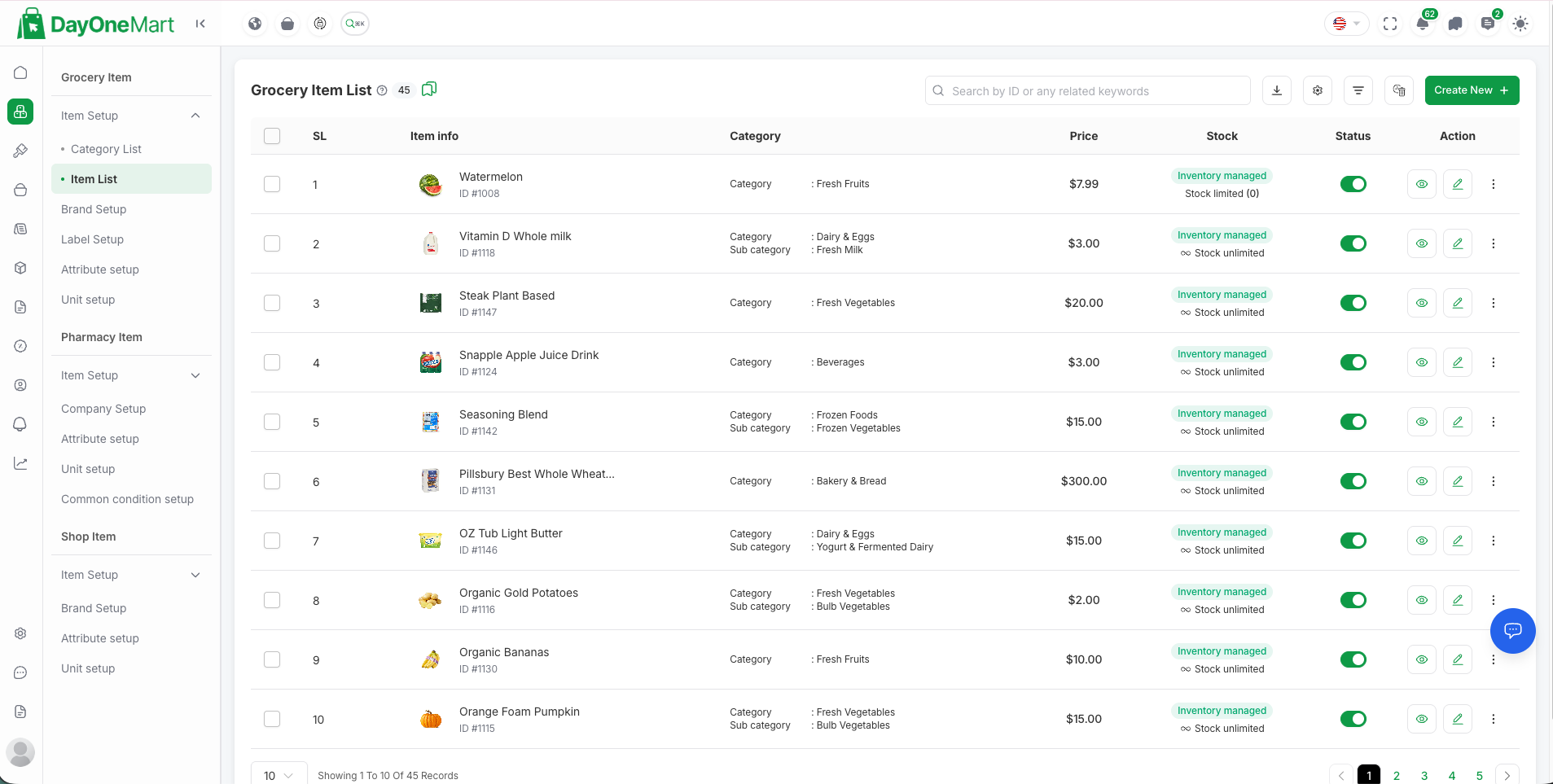
Key areas of this screen
- Item info — the product thumbnail, name, and ID. Use Create New (top right) to add a product with images, pricing, variations, and add-ons.
- Category — the category and sub-category each item belongs to.
- Price — the selling price per item.
- Stock & Status — inventory level and the availability toggle; row actions (view / edit / more) sit on the far right.
Marketing & Promotions
- Coupon codes with usage limits, minimum order value, and expiry
- Flash Sales — time-limited promotional campaigns with countdown timers
- Loyalty points — earn on orders, redeem at checkout, configurable rules
- Push notifications via Firebase Cloud Messaging
- Marketing tools & sales popup configuration
- Newsletter subscriber management
 1
2
3
4
1
2
3
4
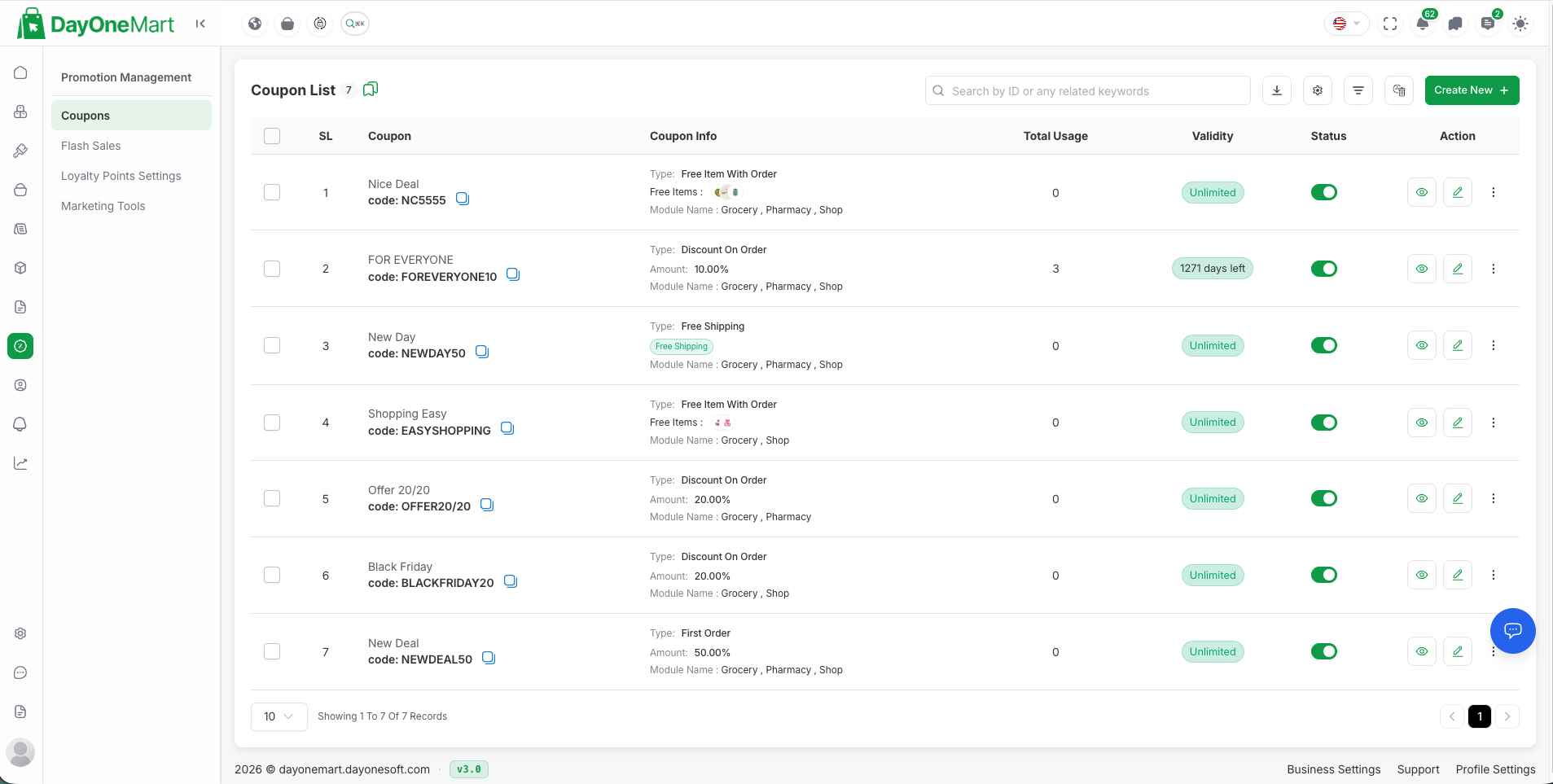
Key areas of this screen
- Coupon name & code — the display name and the code customers enter at checkout.
- Coupon info — discount type (Discount on Order, Free Shipping, Free Item, First Order), amount, and the modules it applies to.
- Validity — how long the coupon is active (Unlimited or a countdown of days left).
- Status & actions — enable/disable toggle plus view, edit, and delete; use Create New (top right) to add a coupon, and the Flash Sales menu for time-limited campaigns.
User Management
- Employees — CRUD, role & permission management (RBAC)
- Deliverymen — CRUD, working hours, earnings tracking
- Customers — CRUD, wallet balance, order history, bulk actions
- Wallet transactions overview
Website & Content
- Page builder for About, Privacy Policy, Terms & Conditions, Refund, Cancel Policy
- Blog management (create, publish, draft)
- FAQ management
- Social media link configuration
- Homepage banner and featured sections control
Communication
- Live chat between admin ↔ customer and admin ↔ deliveryman
- Order-specific customer support
- Push notification campaigns with target selection
Settings & Integrations
- Payment gateways: Stripe, PayPal, Razorpay, Flutterwave, and more
- SMS gateways: Twilio, Nexmo (Vonage)
- Email: SMTP, Gmail, AWS SES, Mailgun
- Firebase: Push notifications, social auth configuration
- Social login: Google, Facebook, Apple
- Google Maps: Geocoding, autocomplete, direction APIs
- Tax rates, currency configuration
- Delivery charge zones and rules
- Cookie consent configuration
- Environment variable management (in-app editor)
System & Security
- Built-in database backup & restore
- Application cache management
- Activity logs
- RBAC — fine-grained employee role permissions
- Two-Factor Authentication (TOTP) for admin accounts
- reCAPTCHA v3 on login
- JWT-based API authentication
Installer & Updater
- Built-in graphical installer wizard at
/install - Built-in updater at
/updater— no SSH required for updates - Purchase code verification
Prerequisites
First: Identify Your Hosting Type (VPS or Shared Hosting)
Commands and file paths in this documentation differ depending on whether your server is a VPS or shared hosting. Take 60 seconds to identify which one you have before installing — it determines which instructions and paths apply to you.
| Question | You have SHARED HOSTING if… | You have a VPS if… |
|---|---|---|
| How do you log in to manage the server? | Through a browser control panel such as cPanel, Plesk, or hPanel, with a visual File Manager. | Through an SSH terminal (e.g. ssh root@your-server-ip) where you type commands. |
| Who installed the web server (Nginx/Apache), PHP, and MySQL? | Your hosting company — they were already there when you signed up. | You (or your developer) installed and configured them yourself. |
| Typical providers / plans | Hostinger, Namecheap, Bluehost, GoDaddy "web hosting" plans — usually a few dollars per month. | DigitalOcean, Hetzner, Vultr, Linode, AWS EC2 "cloud server / droplet / instance" plans. |
| Typical file paths you will see | /home/username/onemart and /home/username/public_html |
/var/www/onemart (web root: /var/www/onemart/public) |
| Root / sudo access? | No — you cannot run sudo, install system packages, or edit Nginx configs. |
Yes — full control of the operating system. |
Throughout this documentation, path examples are labeled accordingly: paths beginning with
/var/www/… are for a VPS, and paths beginning with
/home/username/… are for shared hosting.
Substitute your own username, domain, or folder name where they appear.
Server Requirements
| Requirement | Minimum | Recommended |
|---|---|---|
| PHP | 8.2 | 8.3+ |
| MySQL / MariaDB | 8.0 / 10.4 | 8.0+ / 10.6+ |
| Web Server | Nginx / Apache | Nginx + Octane |
| RAM | 1 GB | 2 GB+ |
| Disk Space | 500 MB | 2 GB+ |
| Node.js | 18 | 20+ LTS |
| Composer | 2.x | Latest |
Required PHP Extensions
The installer wizard automatically verifies all of these on the first step:
PDO_MySQL— MySQL database driverSodium— encryption and hashingMbstring— multibyte string supportOpenSSL— secure connectionscURL— external HTTP requestsFileinfo— file type detectionBCMath— arbitrary precision mathXML— XML parsingZip— archive handlingGDorImagick— image processingSwoole(optional) — required only for Laravel Octane
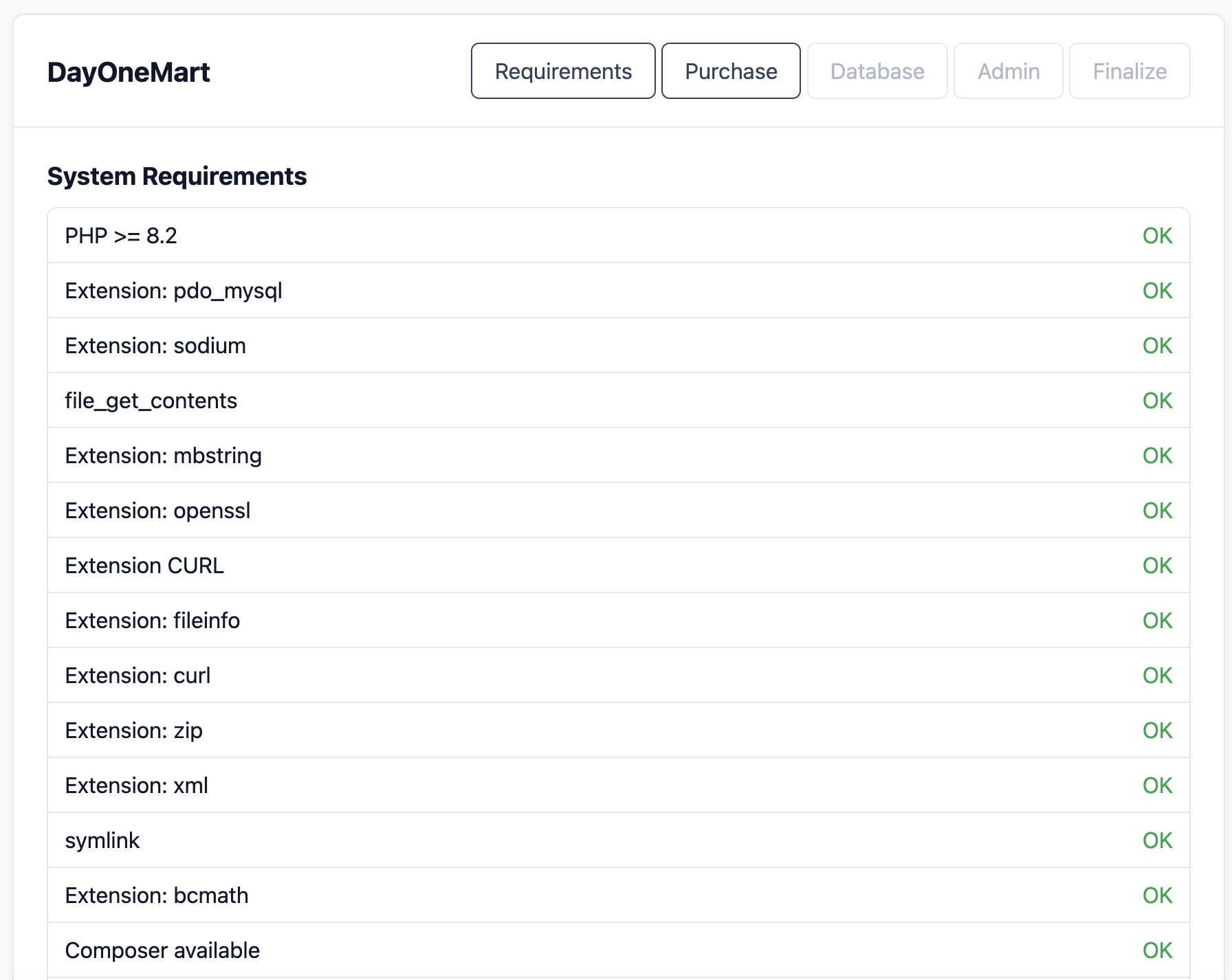
The installer also checks that Composer, Node.js, file_get_contents(), and symlink() are available.
External Services (Recommended)
- Firebase Project — push notifications, social auth, crashlytics
- Google Maps API Key — geocoding, place autocomplete, directions
- SMTP / Mail provider — transactional emails (Gmail, SES, Mailgun, etc.)
- AWS S3 bucket (optional) — file and image storage instead of local disk
Quick Start
- VPS / dedicated server — the project lives in a folder you choose, written as
/path/to/your-project(commonly/var/www/onemart). - Shared hosting (cPanel) — the project lives inside your home directory, written as
/home/username/your-project, whereusernameis your cPanel username.
Pre-flight Checklist
- PHP 8.2+ with all required extensions installed
- Composer 2.x installed globally
- Node.js 18+ and npm installed
- MySQL/MariaDB server running and accessible
- Empty database created for the application
- Web server (Nginx or Apache) configured
- Domain / subdomain pointed to the server
- Purchase code ready
5-Step Quick Install
-
Extract the archive Extract the downloaded ZIP to your server's web directory — VPS: e.g.
/var/www/onemart(written as/path/to/your-projectbelow); shared hosting: e.g./home/username/your-project(see the cPanel walkthrough). Point your Nginx/Apache document root to the/publicfolder. -
Set permissions
# VPS (Ubuntu/Debian) — www-data is the web server user:
chmod -R 775 storage bootstrap/cache
chown -R www-data:www-data .

# Shared hosting (cPanel) — skip chown (files already belong to your
# cPanel user); only set the permissions:
chmod -R 775 storage bootstrap/cache
-
Install dependencies & prepare environment The ZIP does not include the
vendor/folder — runcomposer updateto generate it before continuing.composer update --optimize-autoloader --no-dev npm install npm run build cp .env.example .env php artisan key:generate php artisan jwt:secret
-
Run the installer wizard Visit
https://yourdomain.com/install/requirementsin your browser and follow the 5-step on-screen wizard (details below). -
Post-install production optimization
php artisan config:cache
php artisan route:cache
php artisan view:cache
INSTALLED=true flag is written to your
.env, APP_ENV is set to production,
APP_DEBUG is set to false, and the installer route is
automatically disabled for security.
Installation Process
Pre-Install: Create a MySQL Database
Create a MySQL database and user before running the installer wizard:
CREATE DATABASE onemart CHARACTER SET utf8mb4 COLLATE utf8mb4_unicode_ci;
CREATE USER 'onemart_user'@'localhost' IDENTIFIED BY 'strong_password_here';
GRANT ALL PRIVILEGES ON onemart.* TO 'onemart_user'@'localhost';
FLUSH PRIVILEGES;
Pre-Install: Environment & Dependencies
vendor/ folder.
You must run composer update after extracting the ZIP to generate it,
otherwise the application will fail to boot.
Copy the example environment file, generate keys, and install dependencies:
cp .env.example .env
php artisan key:generate
php artisan jwt:secret
composer update --optimize-autoloader --no-dev
npm install && npm run build
Web Installer Wizard
Navigate to https://yourdomain.com/install/requirements in your browser. The wizard guides you through 5 steps:
Step 1 — System Requirements Check
The installer verifies your server meets all requirements — PHP version, extensions, functions, and tool availability. All checks must show OK before you can proceed.
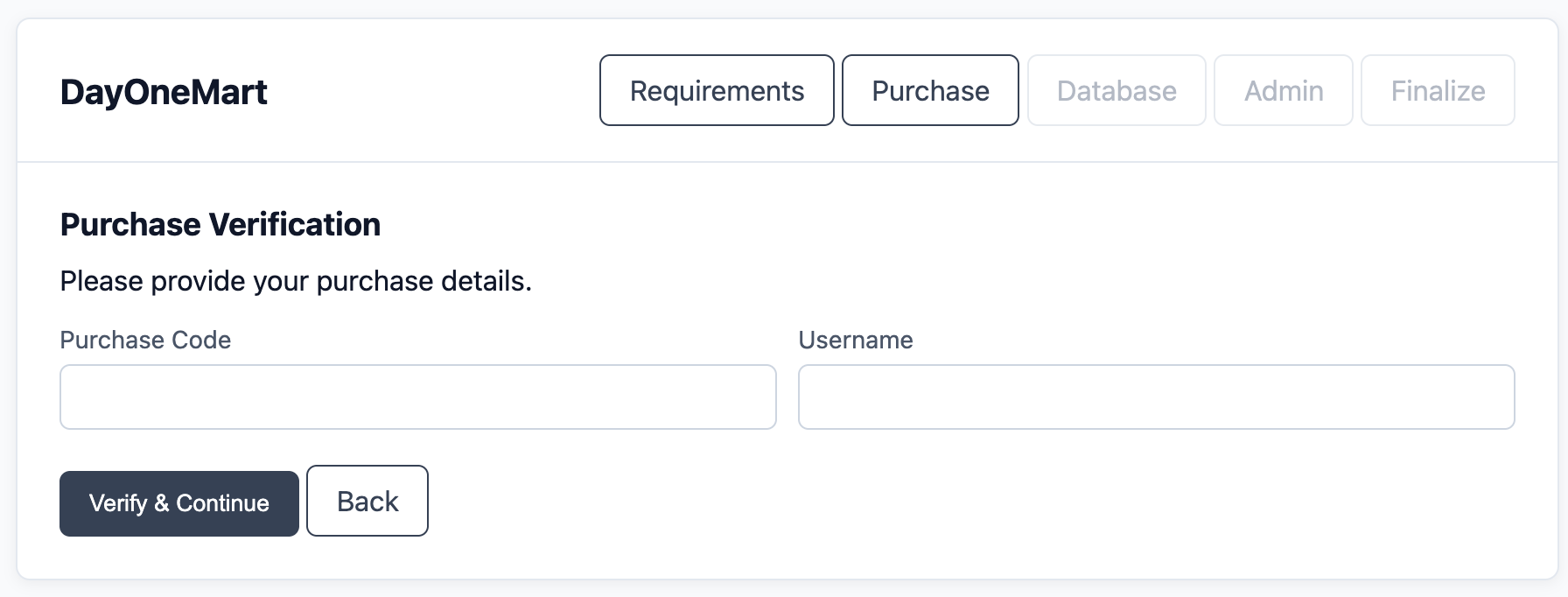
Step 2 — Purchase Verification
Enter your purchase code and username.
Click Verify & Continue to validate your license. Upon success, the
PURCHASE_VERIFIED=true flag is written to .env.
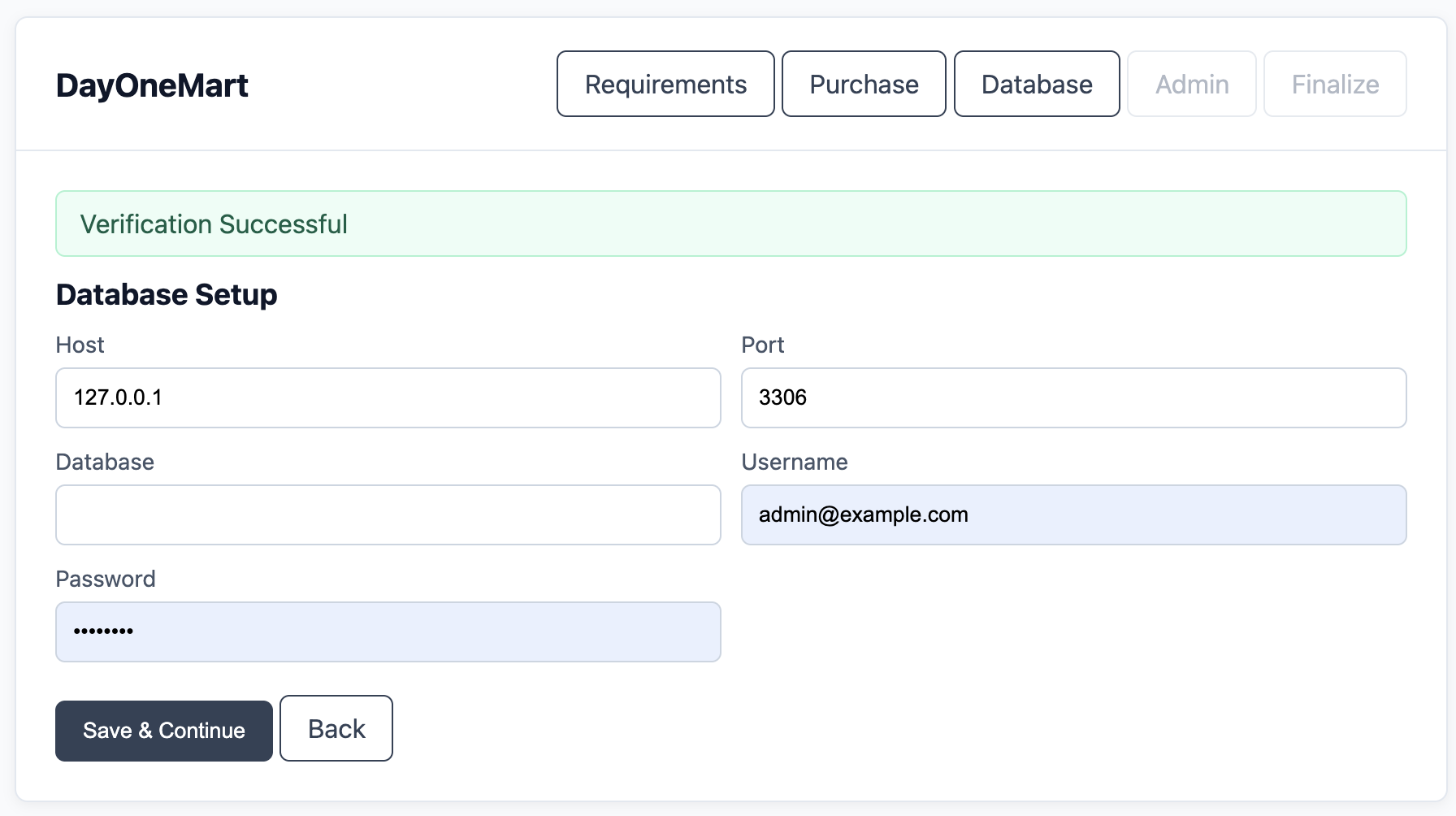
Step 3 — Database Configuration
Enter your MySQL connection details — Host, Port,
Database name, Username, and Password.
The installer tests the connection live before saving. On success, it writes the credentials
to .env and automatically runs all database migrations.
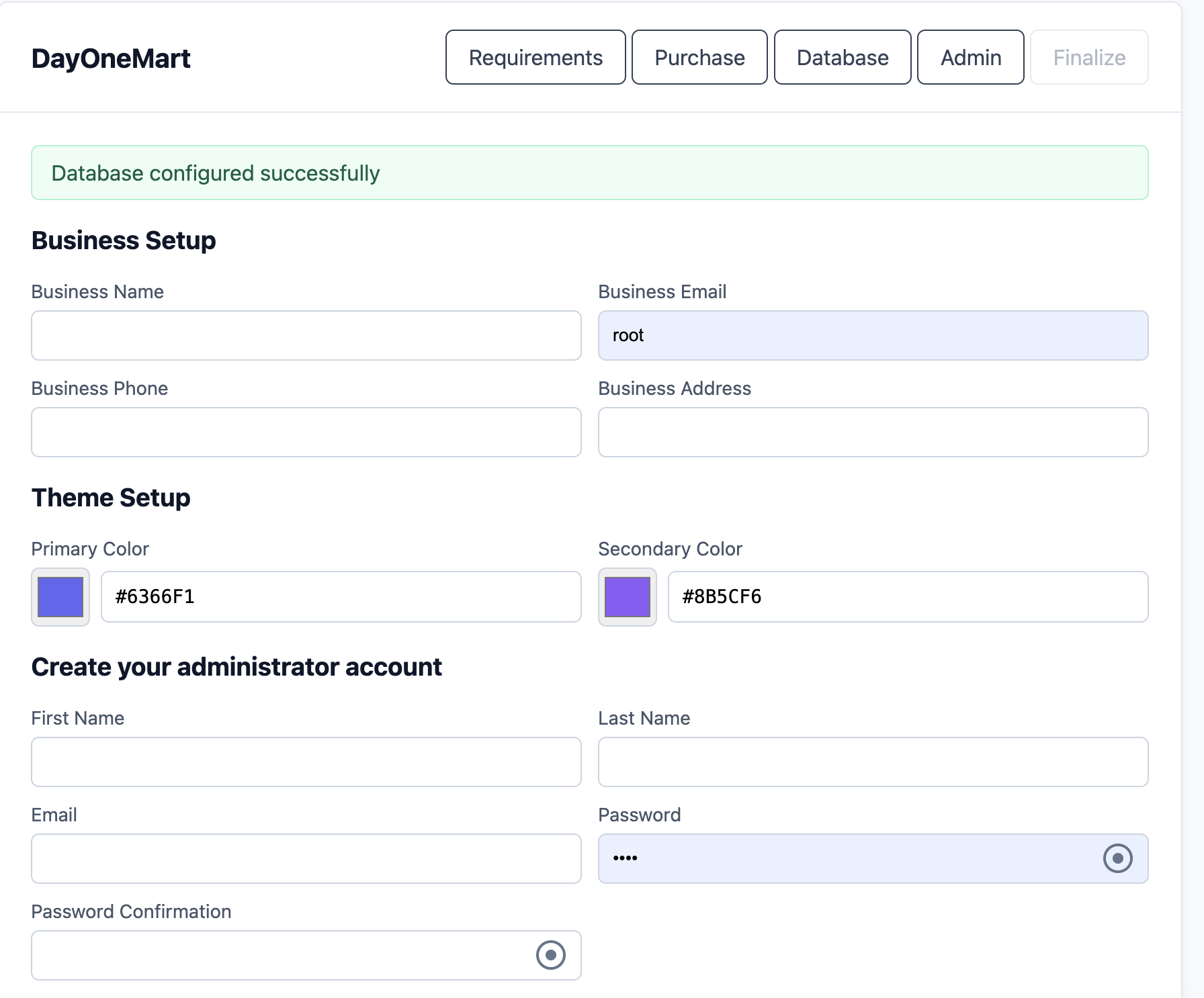
Step 4 — Business & Admin Setup
Configure your business and create the super-admin account on this page:
- Business Setup: Business name, email, phone, and address
- Theme Setup: Primary color and secondary color (hex values, e.g.
#6366F1) - Administrator Account: First name, last name, email, password, and password confirmation (min 8 characters)
The installer creates the business record, the admin user, and runs essential seeders (currencies, website setup, general settings, push notification setup, email templates, modules).
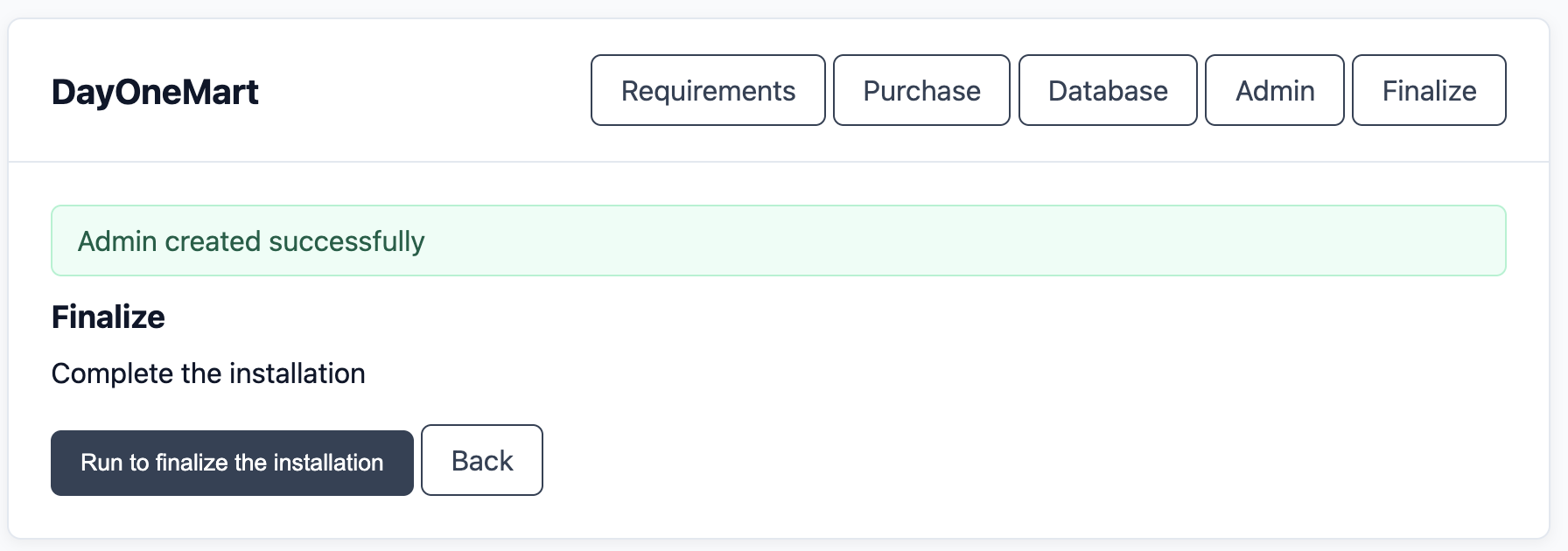
Step 5 — Finalize Installation
Click Run to finalize the installation to complete the setup. The installer automatically:
- Generates the app key if not already set
- Clears all cached config, routes, and views
- Creates the
public/storagesymlink - Sets
INSTALLED=true,APP_ENV=production,APP_DEBUG=false - Sets
APP_URLto your current domain automatically
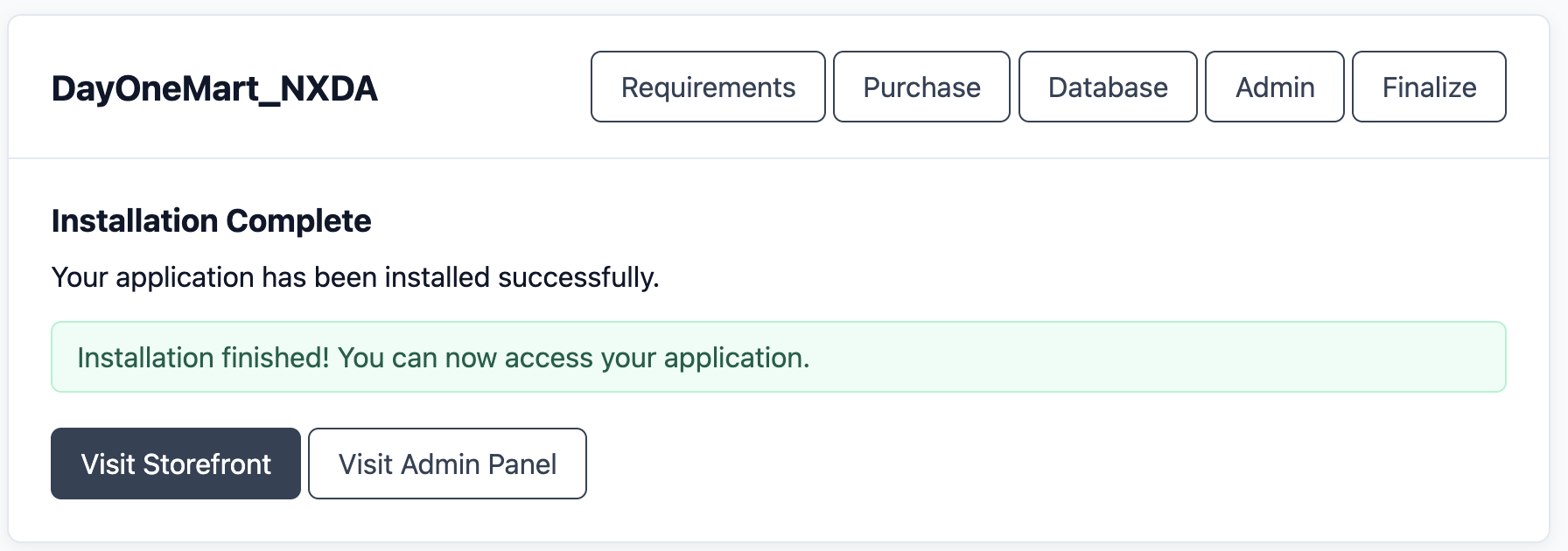
Installation Complete
Once finalized, the success screen appears with links to visit the Storefront or the Admin Panel. Your application is now live.
INSTALLED=true, the /install routes are
disabled by the notInstalled middleware. The installer cannot be re-run unless
you manually set INSTALLED=false in .env.
Post-Install Production Commands
# Cache for production performance
php artisan config:cache
php artisan route:cache
php artisan view:cache

# Start queue worker (use Supervisor in production)
php artisan queue:work --sleep=3 --tries=3 --max-time=3600

# Optional: Start Octane for high performance
php artisan octane:start
Basic Configuration
Core .env Variables
Most of these are configured automatically by the installer wizard. Key values to review after installation:
# Application (set automatically by installer)
APP_NAME=DayOneMart
APP_ENV=production
APP_KEY=base64:YOUR_GENERATED_KEY
APP_DEBUG=false
APP_URL=https://yourdomain.com

# Locale
APP_LOCALE=en
APP_FALLBACK_LOCALE=en

# Database (set by installer wizard — Step 3)
DB_CONNECTION=mysql
DB_HOST=127.0.0.1
DB_PORT=3306
DB_DATABASE=onemart
DB_USERNAME=onemart_user
DB_PASSWORD=strong_password_here

# Session & Cache
SESSION_DRIVER=file
CACHE_STORE=file
QUEUE_CONNECTION=sync

FILESYSTEM_DISK=local

# Octane (optional — remove if not using Swoole)
OCTANE_SERVER=swoole

# JWT (generated via: php artisan jwt:secret)
JWT_SECRET=your_jwt_secret_here

# License (set automatically by installer)
INSTALLED=true
SOFTWARE_ID=20000000
PURCHASE_VERIFIED=true
PURCHASE_CODE=your_purchase_code
PURCHASE_USERNAME=your_username
.env file directly.
Mail Configuration
Supported mail drivers and their key variables:
| Driver | MAIL_MAILER value | Notes |
|---|---|---|
| SMTP | smtp | Any SMTP server (Gmail, custom) |
| Mailgun | mailgun | Set MAILGUN_DOMAIN + MAILGUN_SECRET |
| AWS SES | ses | Set AWS credentials |
| Sendmail | sendmail | Server sendmail binary |
| Log (dev) | log | Writes emails to storage/logs |
Storage Configuration
By default the application uses the local disk (storage/app/public).
To switch to AWS S3, set FILESYSTEM_DISK=s3 and fill in the AWS_*
variables in .env. No other code changes are needed.
Server Configuration
Nginx (Recommended)
server {
    listen 80;
    listen [::]:80;
    server_name yourdomain.com www.yourdomain.com;
    return 301 https://$host$request_uri;
}

server {
    listen 443 ssl http2;
    listen [::]:443 ssl http2;
    server_name yourdomain.com www.yourdomain.com;

    # VPS path — e.g. /var/www/onemart/public
    root /path/to/your-project/public;
    index index.php;

    ssl_certificate     /etc/ssl/certs/yourdomain.crt;
    ssl_certificate_key /etc/ssl/private/yourdomain.key;

    add_header X-Frame-Options "SAMEORIGIN";
    add_header X-XSS-Protection "1; mode=block";
    add_header X-Content-Type-Options "nosniff";

    charset utf-8;

    location / {
        try_files $uri $uri/ /index.php?$query_string;
    }

    location ~ \.php$ {
        fastcgi_pass unix:/var/run/php/php8.3-fpm.sock;
        fastcgi_index index.php;
        fastcgi_param SCRIPT_FILENAME $realpath_root$fastcgi_script_name;
        include fastcgi_params;
    }

    location ~ /\.(?!well-known).* {
        deny all;
    }
}
fastcgi_pass block above with a reverse proxy to the Octane server:
proxy_pass http://127.0.0.1:8000;
Apache (.htaccess)
The public/.htaccess file ships with the application. Ensure mod_rewrite is enabled:
a2enmod rewrite
systemctl restart apache2
SSL / HTTPS
Use Certbot (Let's Encrypt) for a free SSL certificate:
apt install certbot python3-certbot-nginx
certbot --nginx -d yourdomain.com -d www.yourdomain.com
Queue Worker (Supervisor)
Create a Supervisor config to keep the queue worker running persistently:
# /etc/supervisor/conf.d/onemart-worker.conf
# VPS only — Supervisor is not available on shared hosting
# (see the cPanel Limitations table below)

[program:onemart-worker]
process_name=%(program_name)s_%(process_num)02d
command=php /path/to/your-project/artisan queue:work --sleep=3 --tries=3 --max-time=3600
autostart=true
autorestart=true
stopasgroup=true
killasgroup=true
user=www-data
numprocs=2
redirect_stderr=true
stdout_logfile=/var/log/onemart-worker.log
stopwaitsecs=3600
supervisorctl reread
supervisorctl update
supervisorctl start onemart-worker:*
Cron Job
VPS — add the Laravel scheduler to your crontab (crontab -e):
# VPS path — e.g. /var/www/onemart
* * * * * cd /path/to/your-project && php artisan schedule:run >> /dev/null 2>&1
Shared hosting — create the cron job via cPanel → Cron Jobs
instead, using your home-directory path
(php /home/username/your-project/artisan schedule:run) — see
Step 9 of the cPanel walkthrough.
CORS Configuration
CORS headers are managed by Laravel's built-in CORS middleware (config/cors.php).
If the Flutter apps or external services cannot reach the API, verify:
allowed_originsincludes your Flutter app's origin (or*for development)allowed_methodsincludesGET, POST, PUT, DELETE, OPTIONSallowed_headersincludesAuthorization, Content-Type, X-Requested-With, X-localization- For production, restrict
allowed_originsto your actual domains
Deployment
First-Time Deploy
The commands below assume a VPS shell session in the project root
(e.g. cd /var/www/onemart). On shared hosting, follow the
cPanel / Shared Hosting walkthrough below instead.
# 1. Install PHP dependencies
composer install --optimize-autoloader --no-dev

# 2. Build frontend assets
npm ci
npm run build

# 3. Run migrations and seeders
php artisan migrate --force
php artisan db:seed --force

# 4. Create storage symlink
php artisan storage:link

# 5. Cache everything for production
php artisan config:cache
php artisan route:cache
php artisan view:cache
php artisan event:cache

# 6. Set permissions
chmod -R 775 storage bootstrap/cache
chown -R www-data:www-data .    # VPS only — skip chown on shared hosting
Subsequent Deploys
# Pull latest code
git pull origin main

# Refresh dependencies
composer install --optimize-autoloader --no-dev
npm ci && npm run build

# Run new migrations
php artisan migrate --force

# Clear caches then rebuild
php artisan optimize:clear
php artisan optimize

# Restart Octane / queue workers
php artisan octane:reload   # if using Octane
supervisorctl restart onemart-worker:*
Post-Deploy Checklist
- Visit the storefront homepage and confirm products render
- Log in to the admin panel and verify the dashboard loads
- Place a test order end-to-end
- Check queue worker is processing jobs (
php artisan queue:monitor) - Verify email notifications are delivered
- Test push notifications are delivered (Firebase)
- Confirm file uploads and storage links work
cPanel / Shared Hosting
Step 1 — Create a Database
- Open cPanel → MySQL Database Wizard
- Create a new database (e.g.
youruser_onemart) - Create a database user and set a strong password
- Assign ALL PRIVILEGES to the user on that database
Step 2 — Upload & Extract Files
- Open cPanel → File Manager
- Upload
install.zipto/home/username/(abovepublic_html) - Extract the archive — this creates a project folder (e.g.
/home/username/your-project/)
Step 3 — Set the Document Root
Laravel requires the domain to point to the /public folder. On cPanel you have two options:
Option A — Subdomain / Addon Domain (Recommended)
- Go to cPanel → Domains (or Subdomains / Addon Domains)
- Set the document root to
/home/username/your-project/public - This is the cleanest approach — no file moving required
Option B — Move Public Files (if document root cannot be changed)
- Move all contents from
/onemart/public/into/public_html/ - Edit
public_html/index.phpand update the paths:
// Change these two lines:
require __DIR__.'/../vendor/autoload.php';
$app = require_once __DIR__.'/../bootstrap/app.php';

// To point to the project folder:
require __DIR__.'/../onemart/vendor/autoload.php';
$app = require_once __DIR__.'/../onemart/bootstrap/app.php';
Step 4 — Set Permissions
Via cPanel → Terminal (SSH) or File Manager:
cd /home/username/your-project
chmod -R 775 storage bootstrap/cache
chmod 644 .env
Step 5 — Install Dependencies
The install package does not include the vendor/ folder, so you must
generate it with composer update. Connect via SSH and run:
cd /home/username/your-project
composer update --optimize-autoloader --no-dev
cp .env.example .env
php artisan key:generate
php artisan jwt:secret
composer update on
your local machine and upload the resulting vendor/ folder via File Manager / FTP.
Step 6 — Build Frontend Assets
If your hosting provides Node.js via SSH:
npm install
npm run build
public/build/ folder via File Manager or FTP.
Step 7 — Run the Installer Wizard
- Visit
https://yourdomain.com/install/requirementsin your browser - Follow the 5-step wizard: requirements check → purchase verification → database setup → business & admin setup → finalize
Step 8 — Create the Storage Symlink
php artisan storage:link
symlink() is disabled on your hosting, manually create the link via
File Manager or ask your hosting provider to enable it.
Step 9 — Set Up the Cron Job
- Open cPanel → Cron Jobs
- Set the interval to Once Per Minute (* * * * *)
- Enter the command:
php /home/username/your-project/artisan schedule:run >> /dev/null 2>&1
Step 10 — Production Optimization
php artisan config:cache
php artisan route:cache
php artisan view:cache
cPanel Limitations
| Feature | VPS / Dedicated | Shared Hosting |
|---|---|---|
| Laravel Octane (Swoole) | Available | Not available |
| Push Notifications (Firebase) | Available | Available |
| Supervisor (queue workers) | Available | Not available — use QUEUE_CONNECTION=sync |
| Custom Nginx config | Full control | Not available — uses Apache |
| Node.js / npm | Available | May not be available — build locally |
Update Procedure
Using the Built-in Updater (Recommended)
/updater.
vendor/ folder.
After the updater finishes, you must run composer update via SSH so the new
PHP dependencies are installed — otherwise the application may fail to boot or behave
unpredictably after the update.
-
Back up your database Go to Admin Panel → Settings → System → Database Backup and download a fresh backup.
-
Navigate to the updater Visit
https://yourdomain.com/updaterwhile logged in as admin. -
Upload the update ZIP file Download the latest update package and upload it via the updater. The file is uploaded in chunks for reliability on large updates.
-
Run the update Click the update button. The updater extracts files, runs migrations, and clears caches automatically. You will be redirected to a success page upon completion.
-
Regenerate the
vendor/folder Connect via SSH and runcomposer updatein the project root to install the new PHP dependencies that ship with the update:# VPS: cd /path/to/your-project (e.g. /var/www/onemart) # Shared hosting: cd /home/username/your-project cd /path/to/your-project composer update --optimize-autoloader --no-dev php artisan optimize:clear php artisan optimize
On shared hosting without SSH/Composer, runcomposer updatelocally and upload the regeneratedvendor/folder via File Manager or FTP.
Manual Update via SSH
The update ZIP does not contain the vendor/ folder — Step 4
below regenerates it with composer update. Skipping that step will leave the
site broken.
# 1. Put application in maintenance mode
php artisan down --message="Updating, back in 5 minutes" --retry=300

# 2. Backup database
#    (VPS shown; on shared hosting use your cPanel DB user, e.g. youruser_onemart)
mysqldump -u root -p onemart > backup_$(date +%Y%m%d).sql

# 3. Extract and overwrite files (keep your .env and storage/)
# Do NOT overwrite .env or storage/

# 4. Regenerate vendor/ and rebuild frontend assets
#    (the update package does not ship with vendor/)
composer update --optimize-autoloader --no-dev
npm ci && npm run build

# 5. Run migrations
php artisan migrate --force

# 6. Rebuild cache
php artisan optimize:clear && php artisan optimize

# 7. Bring application back online
php artisan up
Localization
The application supports 5 languages out of the box with full RTL support for Arabic:
| Language | Code | Backend | Admin Frontend | Storefront |
|---|---|---|---|---|
| English | en | lang/en/ | AdminPanel/locales/en.json | StoreFront/locales/en.json |
| Bengali | bn | lang/bn/ | AdminPanel/locales/bn.json | StoreFront/locales/bn.json |
| Hindi | hi | lang/hi/ | AdminPanel/locales/hi.json | StoreFront/locales/hi.json |
| Arabic | ar | lang/ar/ | AdminPanel/locales/ar.json | StoreFront/locales/ar.json |
| Spanish | es | lang/es/ | AdminPanel/locales/es.json | StoreFront/locales/es.json |
Adding a New Language
-
Backend: Copy the
lang/en/folder tolang/{code}/and translate all PHP files. -
Admin frontend: Copy
resources/js/AdminPanel/locales/en.jsonto{code}.jsonand translate. -
Storefront: Copy
resources/js/StoreFront/locales/en.jsonto{code}.jsonand translate. -
Sort locale files: Run
npm run sort:localesto ensure consistent key ordering across all files.
Branding & Customization
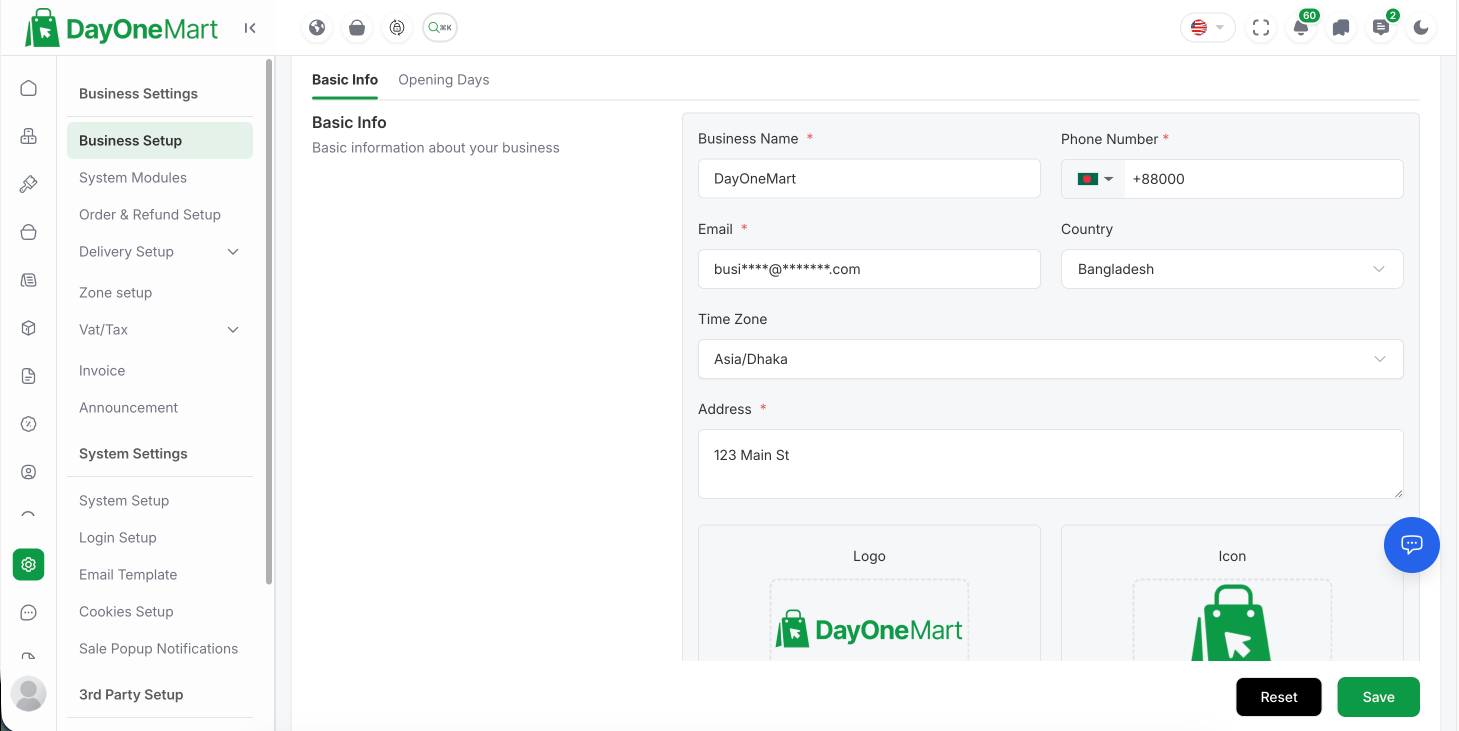
This section is for store owners — no coding required. Everything below is done from the Admin Panel → Settings after installation, so you can make the platform your own: your business name, logo, favicon, and brand colors. A developer-level theming guide (for deeper visual changes) follows at the end. For the complete solution-wide walkthrough — including renaming both mobile apps, app icons, splash screens, and content customization — see the dedicated Branding & Customization Guide.
 1
2
3
4
1
2
3
4
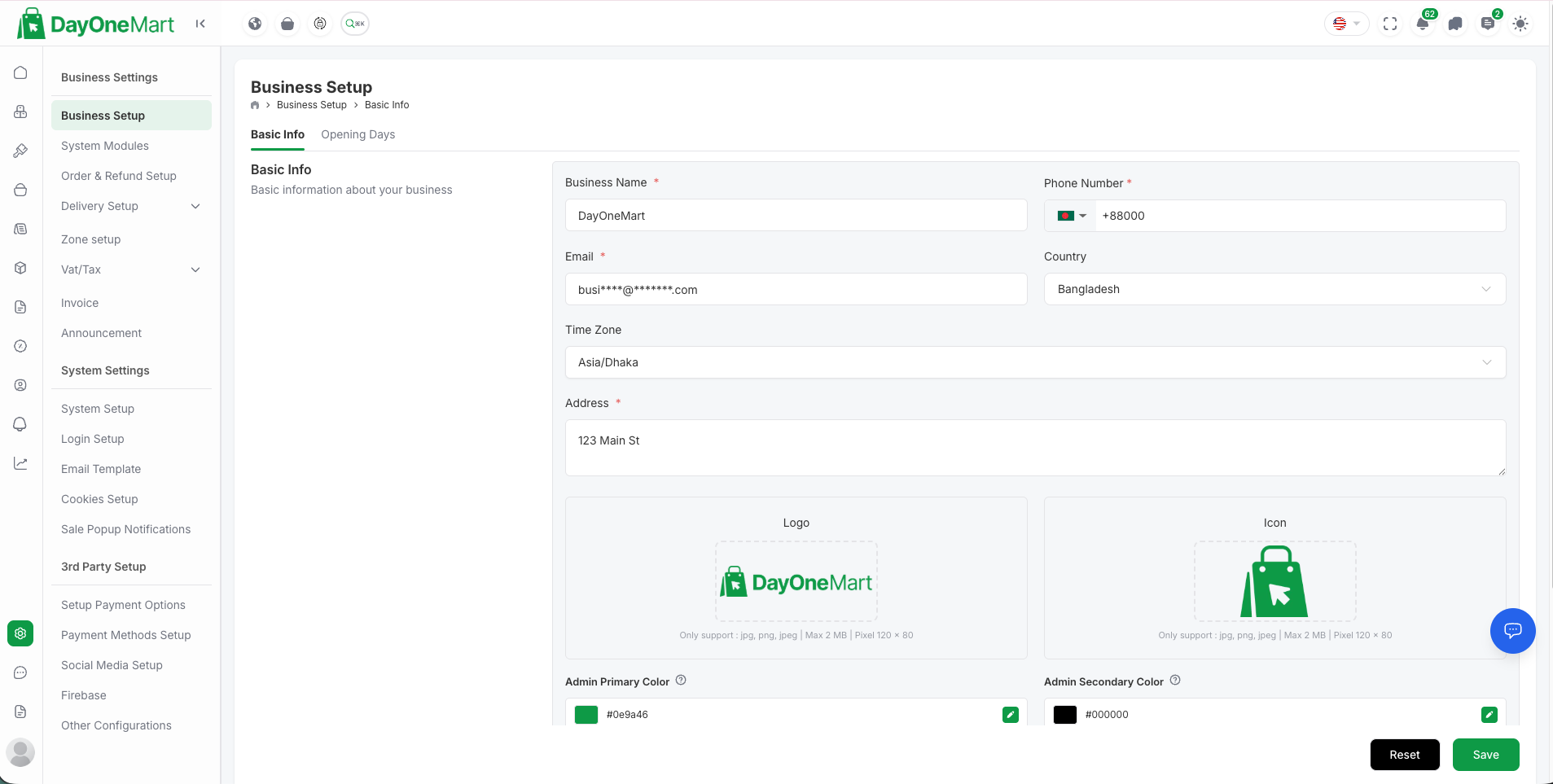
Fields on this screen
- Business Name — displayed across the storefront header, emails, and browser tab title (alongside email, phone, country, time zone, and address).
- Logo — your main brand logo shown in the storefront and admin header (JPG/PNG/JPEG, max 2 MB, ~120 × 80 px).
- Icon — the favicon shown in the browser tab (JPG/PNG/JPEG, max 2 MB).
- Admin Primary & Secondary Color — the accent colors (hex) used for buttons, links, and highlights.
1. Business Name & Identity
-
Open Business Setup Go to Admin Panel → Settings → Business Setup → Basic Info.
-
Set your business name, email, phone, and address These appear in the storefront header/footer, on invoices, and in transactional emails.
-
Save Changes take effect immediately on the storefront — no rebuild or redeploy required.
2. Logo & Favicon
Upload your brand images from Admin Panel → Settings → Business Setup:
| Asset | Where it appears | Recommended size | Format |
|---|---|---|---|
| Main logo | Storefront & admin header | ~300 × 80 px (transparent) | PNG / SVG |
| Favicon | Browser tab | 512 × 512 px (square) | PNG / ICO |
| Email logo | Header of transactional emails | ~300 × 80 px | PNG |
| Login/app banner | Auth & splash areas | 1200 × 600 px | PNG / JPG |
3. Primary Color Scheme
The brand colors set the accent used for buttons, links, badges, and highlights across the storefront and mobile apps.
-
Set the colors during install The installer's Step 4 — Theme Setup asks for a primary and secondary color as hex values (for example
#6366F1). -
Change them any time later Update the primary/secondary colors from Admin Panel → Settings → Business Setup. The storefront picks up the new colors on the next page load.
-
Match your mobile apps To keep branding consistent, set the same hex values in each Flutter app's theme file — see App Theme & Colors in the Customer App and Deliveryman App docs.
4. Developer Theming (Advanced)
For deeper visual changes beyond the admin settings, the storefront and admin UI are styled with Tailwind CSS driven by CSS variables:
- Edit the color tokens and design variables in
resources/css/app.css. - Admin panel pages live in
resources/js/AdminPanel/Pages/; storefront pages inresources/js/StoreFront/Pages/. - Shared UI components are in
resources/js/components/. - After any code-level change, rebuild assets with
npm run build.
app.css if you need to change typography, spacing, or component
styling site-wide.
API Reference (Developers)
The application ships with a Postman collection
(postman-collection.json, ~485 KB) covering all API endpoints.
Import it into Postman or Insomnia for interactive exploration.
Base URL & Versioning
Base URL:  https://yourdomain.com/api/v1
Auth:      Bearer JWT token (Authorization: Bearer {token})
Authentication Flow (JWT)
The API uses JWT bearer tokens (tymon/jwt-auth). A client logs in
once, stores the returned token, and sends it on every subsequent request.
1. Log in to obtain a token
POST /api/v1/auth/login
Content-Type: application/json

{
  "email": "customer@example.com",
  "password": "secret123"
}
Response
{
  "success": true,
  "message": "Login successful",
  "data": {
    "token": "eyJ0eXAiOiJKV1QiLCJhbGciOiJIUzI1NiJ9...",
    "token_type": "bearer",
    "expires_in": 3600,
    "user": { "id": 12, "name": "Jane Doe", "email": "customer@example.com" }
  }
}
2. Call a protected endpoint with the token
GET /api/v1/customer/orders
Authorization: Bearer eyJ0eXAiOiJKV1QiLCJhbGciOiJIUzI1NiJ9...
3. Refresh an expiring token
POST /api/v1/auth/refresh
Authorization: Bearer {current_token}
Standard Request Headers
| Header | Value | Required |
|---|---|---|
Authorization | Bearer {token} | On protected routes |
Content-Type | application/json | On POST/PUT |
Accept | application/json | Recommended |
X-localization | en / bn / hi / ar / es | Optional — sets the response language |
Standard Response Envelope
All API responses follow a consistent JSON shape, so clients can parse them uniformly:
// Success
{ "success": true,  "message": "...", "data": { ... } }

// Paginated list
{ "success": true, "data": [ ... ], "meta": { "current_page": 1, "last_page": 5, "total": 92 } }

// Validation / error
{ "success": false, "message": "The given data was invalid.",
  "errors": { "email": ["The email field is required."] } }
HTTP Status & Error Codes
| Code | Meaning | Typical cause |
|---|---|---|
200 | OK | Successful GET/PUT/DELETE |
201 | Created | Successful POST that created a record |
401 | Unauthorized | Missing, invalid, or expired token |
403 | Forbidden | Authenticated but lacks permission (RBAC) |
404 | Not Found | Resource or route does not exist |
422 | Unprocessable Entity | Validation failed — see errors object |
429 | Too Many Requests | Rate limit exceeded |
500 | Server Error | Check storage/logs/laravel.log |
postman-collection.json). Import it to try
each call live against your own installation.
Customer API Endpoints
| Group | Endpoints |
|---|---|
| Authentication | login, OTP login, sign-up, forgot-password, verify-OTP, reset-password, Google / Facebook / Apple social login, logout, refresh, check-user-exists |
| App Config | home screen, app config, geocode-reverse, place-autocomplete, map-place-details, map-direction |
| Products | list, detail, by-category, search, featured, popular, recommended |
| Categories | list, show, featured, popular |
| Cart | get, add, update quantity, update item, remove |
| Checkout | place-order, apply-delivery-charge, coupon apply/remove |
| Orders | list, show, cancel, track (public), invoice, history |
| Wallet | show, add-money |
| Loyalty Points | config, histories, redeem |
| Notifications | list, unread count, mark-read, mark-all-read, delete, preferences |
| Chat | list, start-chat, show, messages, send-message |
| Profile | show, update, change-password, delete-account, settings |
| Addresses | CRUD delivery addresses |
| Wishlist | list, add, delete |
| Reviews | CRUD product reviews |
| Refund Requests | list, show, store, cancel |
Admin API Endpoints
| Group | Endpoints |
|---|---|
| Auth | login, verify-2FA, logout, refresh |
| Dashboard | summary stats, recent orders, real-time data |
| Products & Menu | items, categories, sub-categories, cuisines, labels, menu-types, addons — full CRUD + status toggle |
| Orders | list, show, update status, assign deliveryman, cancel, refund, bulk actions |
| Users | customers, deliverymen, employees — CRUD, bulk actions, role management |
| Promotions | coupons, flash sales — full CRUD + status |
| Notifications | create, send, bulk actions, mark-seen |
| Settings | business setup, payment gateways, SMS gateways, Firebase, social auth, email, tax, currency, delivery charges, cookies, marketing tools |
| Analytics | sales, category performance, user activity |
| System | cache clear, env variable CRUD, DB backups |
Deliveryman API Endpoints
| Group | Endpoints |
|---|---|
| Auth | login, OTP login, forgot-password, verify-OTP, reset-password, logout, refresh |
| Dashboard | summary stats, earnings, delivery overview |
| Orders | list assigned orders, show details, update status, accept/reject |
| Profile | show, update, FCM token, change-password, delete-account, settings |
| Chat | list, conversations, messages, send-message |
| Notifications | list, mark-read, mark-all-read, delete |
| Config | app config, terms, support, map-direction |
Troubleshooting
Common Environment Configuration Errors (.env)
Most post-install failures trace back to one of these .env misconfigurations.
After any .env change, run php artisan config:clear
(and php artisan config:cache in production) or the change will not take effect.
| Symptom | Misconfigured variable | Fix |
|---|---|---|
| "No application encryption key has been specified" | APP_KEY empty |
Run php artisan key:generate then php artisan config:clear |
| App users logged out / API returns 401 for everyone | JWT_SECRET missing or changed |
Run php artisan jwt:secret once; never regenerate it casually — it invalidates all tokens |
SQLSTATE[HY000] [1045] Access denied |
DB_USERNAME / DB_PASSWORD / DB_DATABASE |
Match the credentials created in Pre-Install: Create a MySQL Database; re-grant privileges if needed |
SQLSTATE[HY000] [2002] Connection refused / timed out |
DB_HOST / DB_PORT |
Use 127.0.0.1 for a local DB; for managed databases use the remote endpoint and open port 3306 (details in the FAQ) |
| 419 Page Expired on login; assets load over HTTP; wrong links in emails | APP_URL doesn't match the real domain |
Set APP_URL=https://yourdomain.com exactly as typed in the browser, then php artisan config:cache |
| Stack traces shown publicly on errors | APP_DEBUG=true in production |
Set APP_DEBUG=false and APP_ENV=production (the installer does this automatically) |
| Site redirects back to the installer, or installer unreachable after install | INSTALLED flag |
INSTALLED=true disables /install; set it to false only to deliberately re-run the installer |
| Uploaded images return 404 | FILESYSTEM_DISK / missing symlink |
Run php artisan storage:link; for S3 set FILESYSTEM_DISK=s3 and all AWS_* keys |
| Emails / push notifications queued but never sent | QUEUE_CONNECTION |
With database/redis a worker must be running (php artisan queue:work); on shared hosting without a worker use sync |
| 500 error mentioning Swoole / Octane on a host without Swoole | OCTANE_SERVER |
Remove the OCTANE_SERVER line and serve via PHP-FPM — Octane is optional |
500 — Internal Server Error
- Check
storage/logs/laravel.logfor the root cause - Set
APP_DEBUG=truetemporarily in.envto see the exception in the browser - Run
php artisan config:clear && php artisan cache:clear - Verify
storage/andbootstrap/cache/are writable by the web server
Vite Manifest Not Found
npm install
npm run build
php artisan view:clear
Images / Uploads Not Showing
php artisan storage:link
# If the symlink already exists but is broken:
rm public/storage
php artisan storage:link
404 — Page Not Found
- Confirm the document root points to
/public— on a VPS check your Nginx/Apache config; on shared hosting check cPanel → Domains → Document Root - For Nginx: ensure
try_files $uri $uri/ /index.php?$query_string;is present - For Apache: confirm
mod_rewriteis enabled andAllowOverride Allis set
Emails Not Sending
- Verify
MAIL_*variables in.envare correct - Ensure the queue worker is running (
php artisan queue:work) - Check
storage/logs/laravel.logfor mail errors - Test with
php artisan tinker:Mail::raw('test', fn($m) => $m->to('test@example.com'));
CSRF Token Mismatch
- Clear browser cookies and try again
- Verify
APP_URLin.envmatches the actual domain (includinghttps://) - Run
php artisan config:clear
Queue Jobs Not Processing
# Check if queue worker is running
supervisorctl status onemart-worker:*

# Restart if needed
supervisorctl restart onemart-worker:*

# Run manually to debug
php artisan queue:work --verbose
Push Notifications Not Working
- Verify Firebase credentials are configured correctly in Admin Panel → Settings → Firebase
- Ensure the Firebase service account JSON file is uploaded and valid
- Check that the FCM server key matches your Firebase project
- Confirm the device has granted notification permissions
- Check
storage/logs/laravel.logfor FCM errors
Permission Errors
chmod -R 775 storage bootstrap/cache
chown -R www-data:www-data storage bootstrap/cache
FAQ & Environment-Specific Issues
Answers to the most common questions and environment-specific hurdles encountered during installation and deployment across different hosting setups (VPS, shared hosting, cloud, and local development).
Database connection timeouts
Symptoms: SQLSTATE[HY000] [2002] Connection timed out,
[2002] Connection refused, or [2006] MySQL server has gone away
during the installer's database step or while the app is running.
- Confirm
DB_HOSTis correct. On many managed/cloud databases the host is a remote endpoint, not127.0.0.1. Usinglocalhostforces a socket connection — use127.0.0.1to force TCP if the socket path differs. - Verify the database server is reachable from the web server:
telnet DB_HOST 3306ornc -zv DB_HOST 3306. - Open port 3306 in the firewall / security group, and whitelist the web server's IP in your cloud database's access list.
- For large seeders/imports timing out, raise MySQL
wait_timeoutandmax_allowed_packet, and PHPmax_execution_time(see below). - Double-check the credentials and database name match exactly what you created in Installation Process → Pre-Install: Create a MySQL Database.
Permission errors (storage / bootstrap / cache)
Symptoms: The stream or file "storage/logs/laravel.log" could not be opened: failed to
open stream: Permission denied, or a white screen after install.
# Grant read/write to the framework-managed directories
chmod -R 775 storage bootstrap/cache

# Give ownership to the web-server user
#   Nginx/Apache on Ubuntu/Debian: www-data
#   Apache on CentOS/RHEL:          apache
#   cPanel/shared hosting:          your cPanel username
chown -R www-data:www-data storage bootstrap/cache
- Use the correct web-server user for your OS (see the comments above).
- On SELinux systems (CentOS/RHEL), also allow httpd write access:
chcon -R -t httpd_sys_rw_content_t storage bootstrap/cache. - On shared hosting, set folders to
755and files to644if775is rejected by the host's security policy.
"No application encryption key has been specified"
php artisan key:generate
php artisan config:clear
Installer times out or fails midway (max_execution_time / memory_limit)
Migrations and seeders can exceed conservative PHP limits on shared hosting. Raise these in
php.ini (or via .user.ini / cPanel → MultiPHP INI Editor):
max_execution_time = 300
memory_limit = 512M
max_input_time = 300
Large update ZIP or CSV import is rejected
Increase the upload limits so the updater and bulk import can accept larger files:
upload_max_filesize = 128M
post_max_size = 128M
419 — Page Expired on login
- Ensure
APP_URLexactly matches the address in the browser, includinghttps://and any subdomain. - Confirm
storage/framework/sessionsis writable (see permission errors above). - Clear browser cookies for the domain, then run
php artisan config:clear.
Assets load over HTTP / mixed-content warnings behind a proxy or load balancer
- Set
APP_URL=https://yourdomain.comin.env. - Behind a reverse proxy/load balancer terminating SSL, ensure the
X-Forwarded-Protoheader is forwarded so Laravel generateshttpsURLs. - Run
php artisan config:cacheafter changingAPP_URL.
Composer runs out of memory on shared hosting
php -d memory_limit=-1 $(which composer) update --optimize-autoloader --no-dev
If Composer or SSH is unavailable, run composer update locally and upload the
generated vendor/ folder — the package ships without it by design.
Emails, push notifications, or payments are not working after install
These integrations are configured in Admin Panel → Settings after
installation, not in .env. See the Troubleshooting
section for driver-specific checks.
Extending the Platform
This section is for developers building on top of DayOneMart. The codebase follows standard Laravel 12 conventions with a service-oriented structure, so most extensions are additive — you add controllers, services, routes, and Vue pages without modifying core files.
Architecture at a Glance
| Layer | Location | Responsibility |
|---|---|---|
| Routes | routes/api/v1/, routes/web/ | Endpoint & page registration |
| Controllers | app/Http/Controllers/ | Request handling (thin) |
| Form Requests | app/Http/Requests/ | Validation rules |
| Services | app/Services/ | Business logic (fat) |
| Models | app/Models/ | Eloquent data layer |
| Resources | app/Http/Resources/ | API JSON transformers |
| Events / Jobs | app/Events/, app/Jobs/ | Async & decoupled side-effects |
Add a New API Endpoint (End-to-End)
-
Create a controller Place it under
app/Http/Controllers/Api/and keep it thin — delegate logic to a service.php artisan make:controller Api/V1/Customer/FavoriteController
-
Add a Form Request for validation
php artisan make:request StoreFavoriteRequest
-
Put the business logic in a service Add a class under
app/Services/and inject it into the controller's constructor. -
Return an API Resource Transform the model with a Resource in
app/Http/Resources/so the response matches the standard envelope (success,message,data). -
Register the route Add it to the correct file —
routes/api/v1/customer.php,admin.php, ordeliveryman.php— inside the JWTauth:apimiddleware group.Route::middleware('auth:api')->group(function () { Route::apiResource('favorites', FavoriteController::class); }); -
Test it Call the new route with a bearer token, then add it to
postman-collection.jsonso it stays documented.
Events & Listeners
Decouple side-effects (emails, push notifications, logs) from your core flow by firing events instead of calling services inline:
# Generate an event and a listener
php artisan make:event OrderPlaced
php artisan make:listener SendOrderPushNotification --event=OrderPlaced

# Dispatch from anywhere in your code
event(new OrderPlaced($order));
Register the mapping in app/Providers/EventServiceProvider.php (or via auto-discovery).
Queued Jobs (Background Work)
Offload slow work (bulk notifications, exports, third-party API calls) to the queue so requests stay fast:
php artisan make:job ProcessBulkImport

# Dispatch it
ProcessBulkImport::dispatch($payload);
php artisan queue:work) and
QUEUE_CONNECTION set to database or redis. On shared
hosting without a persistent worker, keep QUEUE_CONNECTION=sync so jobs run inline.
Add a Database Column / Migration
php artisan make:migration add_gift_note_to_orders_table
# edit the migration, then:
php artisan migrate
Add an Admin Page / Module
-
Create the Vue page under
resources/js/AdminPanel/Pages/, following an existing module (e.g.Orders/) as a template. -
Add a web route in
routes/web/admin.phpthat renders the page via Inertia. -
Add the sidebar/menu entry and wire up any RBAC permission so it respects employee roles.
-
Rebuild assets with
npm run build(ornpm run devduring development).
Backend — Controllers & Services (Reference)
- API controllers live in
app/Http/Controllers/Api/ - Business logic is extracted to
app/Services/ - Eloquent models are in
app/Models/ - Follow standard Laravel conventions — register new routes in
routes/api/v1/
Frontend — Vue & Tailwind
- Admin panel pages:
resources/js/AdminPanel/Pages/ - Storefront pages:
resources/js/StoreFront/Pages/ - Shared components:
resources/js/components/ - Add Shadcn components:
npm run shadcn:adminornpm run shadcn:storefront - Tailwind config is driven by CSS variables — edit
resources/css/app.cssto change the color scheme - After changes, rebuild with
npm run build
Translations / i18n
- Backend translations:
lang/{en,bn,hi,ar,es}/ - Admin frontend locales:
resources/js/AdminPanel/locales/ - Storefront locales:
resources/js/StoreFront/locales/ - Sort locale files after editing:
npm run sort:locales
Adding a Payment Gateway
-
Create the controller in
app/Http/Controllers/Payment/implementing the gateway's webhook and redirect callbacks. -
Register routes in
routes/payment.php. -
Add the gateway to settings — register it in the admin panel's payment gateway list and add the necessary
.envvariables.
Email Templates
Laravel Mailable classes are in app/Mail/. Blade email views are in
resources/views/emails/. Customize the HTML/CSS directly in those files.
Development Workflow
# Start all dev services concurrently (PHP server + queue listener + logs + Vite)
composer dev

# Or start individually:
php artisan serve                    # PHP dev server on port 8000
npm run dev                          # Vite dev server with HMR
php artisan queue:listen --tries=1   # Queue listener
php artisan pail                     # Tail logs in terminal

# Optional services:
php artisan octane:start             # Octane performance server (if enabled)
Need help? Reach us via the item’s Support tab on CodeCanyon or dayonesoft.com or visit our website for support.